monday.com
How do I sum numbers from multiple boards into one total in monday.com?
monday.com can show you a sum from another board, but it cannot natively give you one real, editable total that adds a number column across several separate boards. Mirror and formula columns are read-only, so even when a mirror displays a sum, you cannot feed that number into an automation, use it as an input to another formula, or treat it as a total you can type or correct. The wall is not that monday cannot add. It is that the number you get back is a reflection, not a value you own.
Here is the shape of the problem in one picture.
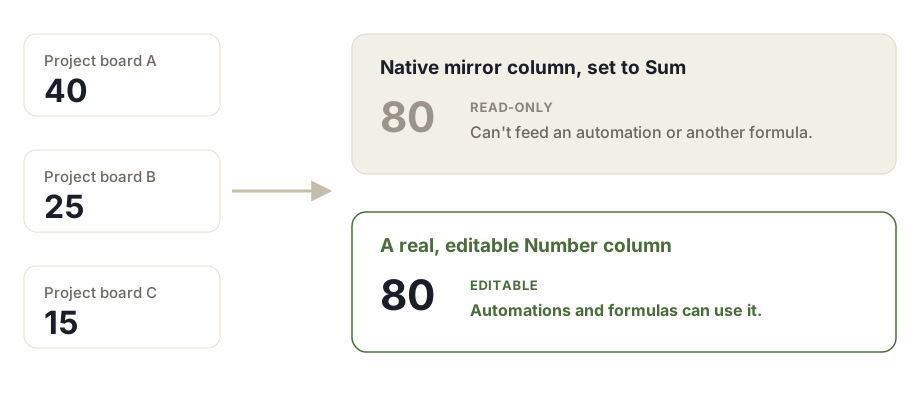
What monday can and cannot do here
Start with what works, because it is easy to over-state the limitation. With a Connect Boards column and a mirror column, you can point at items on another board, mirror their number column, and switch the mirror to show a sum. That sum is real and it updates when the source changes. For a single overview that just needs to display a rolled up figure, this is often enough.
The problem shows up the moment you want to do something with that number. A mirror is a read-only reflection of its source. So is a formula column. That has three consequences that block the summary board most teams actually want:
- You cannot feed a mirrored sum into an automation. It is not a valid trigger or input.
- You cannot feed it into another formula. A formula column cannot read a mirror or another formula.
- You cannot edit or override it. There is no version of the number you control.
Add the cross-board part and it gets harder. A mirror aggregates the items you connect through the Connect Boards column, one wiring at a time. There is no native switch that says "sum this number column across all of these boards into one figure." So a real, editable total that adds a number column from several independent boards, and that the rest of your workflow can act on, is not something monday builds for you.
Source: monday.com, The Formula Column (note that a formula "can read data from other column cells, but not from the column summary or any other area of the board").
Why this specific gap exists
monday's data model separates stored columns from reflected columns. A Number column holds a value you typed or an automation set. A mirror or formula column computes a view of other data at read time. The platform is deliberate about this: reflected columns are output, not input, which is why they cannot be written to or consumed downstream.
That design is fine until your reporting depends on a figure that lives on several boards at once. Cross-board rollup needs a value that behaves like a stored number, so that automations can fire on it, formulas can build on it, and a person can sanity-check or adjust it. A reflection cannot be any of those things. The gap is structural, not a missing setting you have overlooked.
This question comes up repeatedly in the monday community, usually phrased as summing a column into a totals column on another board, or asking whether the sum of a mirror can be used in a workflow.
Source: monday community, is it possible to use sum of mirror columns in workflows.
What people try, and where each one breaks
| Approach | What it does | Where it breaks |
|---|---|---|
| Connect Boards + mirror set to sum | Displays a rolled up sum from connected items | Read-only. Cannot automate on it, cannot feed a formula, only covers connected items |
| Formula column | Calculates from cells on the same item | Cannot read across boards, cannot read a mirror or another formula, cannot read the column summary |
| Sub-item rollup | Totals sub-items up to their parent | Stays inside one board and one parent, not a total across separate boards |
| Dashboard number widget | Shows a combined total across boards in a view | Lives in a dashboard, not as a column on a board, so nothing on the board can use it |
| Make or Zapier | Can write a real number by pushing data between boards | External tool, extra cost, and each run consumes automation or task quota |
The dashboard widget is worth calling out because it is the closest native answer, and it is genuinely useful for a human looking at a report. It just does not put the total back on a board as a column, so automations, formulas, and item level logic still cannot reach it.
A workaround you can set up today
If you need something now and can accept the limits, here is the most reliable native approach for a read-only overview:
- On your summary board, add a Connect Boards column and connect the items you want to total.
- Add a mirror column that points at the number column on the connected items.
- Set the mirror to display Sum.
- If you have several source boards, repeat the connect and mirror per board, then place a dashboard Numbers widget over all of them for a single combined figure for reporting.
This gives you a live, readable total. Keep in mind what it is not: the mirrored figures stay read-only, the dashboard total is not a board column, and you are wiring connections by hand. For a simple "how much across these projects" glance, that is often acceptable.
What a real fix looks like
If the read-only ceiling is the actual blocker, the shape of a proper solution is specific. It reads the number columns from your source boards and writes a real, editable Number column on the summary board. Not a mirror, but a stored value that behaves exactly like one you typed by hand.
Because it is a real number, everything that could not touch a mirror now works:
- Automations can trigger on it and act on it.
- Other formulas can use it as an input.
- A person can read it, trust it, and correct it if a source needs a manual adjustment.
A useful fix also matches the source number columns across boards by title, gives you the common aggregations such as sum, count, average, minimum and maximum, and shows a per board breakdown so the total is auditable rather than a black box. And it should leave your source boards untouched and read-only, so the rollup never risks changing the underlying data.
One distinction keeps this honest. Totaling numbers across boards is a different job from mirroring or syncing the same item onto several boards. If what you actually want is the same record to appear and stay in sync on multiple boards, that is item mirroring, and it is a separate need with its own tools. The gap described here is narrower and specific: turning number columns spread across boards into one real total column you can build on.
The short version
monday can display a cross-board sum through a mirror, and a dashboard can show a combined figure for reporting. What it does not do natively is give you a single, real, editable total column on a summary board that adds number columns from several independent boards and that the rest of your workflow can act on. Mirror and formula columns are read-only by design, which is exactly why they cannot fill that role. Knowing that distinction saves you from wiring an elaborate mirror setup and then discovering the number cannot do the one thing you needed it to do.
Frequently asked questions
Can monday.com sum a number column from another board?
Partly. With a Connect Boards column and a mirror column you can display a sum of a number column from the items you connect. That mirrored sum is read-only. You cannot type into it, feed it into an automation, or use it as an input to another formula, and it only covers the items you connected, not a real total across several independent boards.
Why can't I use a mirror column's sum in an automation or a formula?
Mirror and formula columns are read-only reflections, not stored values. monday treats them as display output rather than data you can act on, so they are not valid triggers or inputs for automations, and a formula column cannot read another formula or mirror column. The number you see is real, but nothing downstream can consume it.
Can a formula column pull a total from multiple boards?
No. A formula column reads other column cells on the same item. It cannot read across boards, and monday's own documentation notes it cannot read the column summary at the bottom of a board either. So a formula cannot assemble a total from several separate boards on its own.
How do I get one editable total that adds numbers from several separate boards?
Natively you approximate it with a Connect Boards column plus a mirror set to sum, one connection at a time, and accept that the result is read-only. To get a single real, editable Number column on a summary board that adds values from several independent boards and that automations and formulas can use, you need something that writes an actual number rather than mirroring one.
Is the mirrored sum on a summary board editable?
No. A mirror always reflects its source and is read-only by design. You cannot correct it, override it, or build an automation that changes it. If you need a total you can edit or act on, a mirror is the wrong column type for the job.
Does connecting boards let me total across all of them automatically?
Only for the items you explicitly connect through the Connect Boards column. There is no native setting that says add this number column across every one of these boards into one figure. You wire connections item by item, and the resulting sum is still a read-only mirror.
Tovrio builds apps for monday.com teams. Learn more.